At a glance
The project,
on one page.
The problem
A settings screen
isn't a security test.
We clean hacked WordPress sites, and look after them afterwards. Every security plugin we meet gives the owner the same thing: a page of switches, each one saying a protection is on. None of them answers the question an owner actually has, which is "if someone attacked my site right now, would this stop them?"
The gap between "switched on" and "working" is real. A firewall left in monitor mode logs attacks without blocking them. A host that runs PHP in the uploads folder makes upload protection beside the point. A proxy that hides visitors' real addresses makes every lockout hit the wrong person. On the settings screen, all three look exactly like protection.
So the brief was simple to say and hard to build: a security plugin that tests itself, on the real site, and reports honestly when a protection is off or failing.
Chapter 1 · June 2026
Our first pitch
was wrong.
The first working version was built on 25 June 2026: 17 PHP files, about 100 KB, with two-factor codes checked against the official test values in the standard (RFC 6238). The plan around it assumed gaps in the competition that weren't there.
Why this is in a case study: the same habit runs through our client work. We check the claim before we build on it, including our own claims, and we write down when we were wrong.
Chapter 2 · September 2026
What 529 bad reviews
taught us.
Before the first public release we read what site owners say when a security plugin lets them down: 529 one-to-three-star reviews of four dedicated WordPress security plugins on WordPress.org, written between 2013 and 2026. This is how often each problem came up.
Method: one-to-three-star WordPress.org reviews of four dedicated security plugins, collected 8 September 2026 (a multi-purpose plugin's 551 reviews were left out). Each problem counted by keyword across the review's title and text; one review can count towards several. Totals are shown in aggregate, never per plugin.
Each complaint, and what SecureLite does instead.
| What went wrong for site owners | What SecureLite does instead | Since |
|---|---|---|
| Upsells, nags or features behind a paywall | Every feature free, and nothing in the plugin today will ever move behind a paywall. | Launch |
| Broke the site (white screen, 500, fatal error) | Firewall starts in monitor mode; every wp-config.php edit is checked to be valid PHP before it is saved; .htaccess is never written. | 0.2.10 · 0.2.12 |
| Left things behind after removal | Deactivating hands back what it added; uninstalling removes its tables, settings and jobs completely. | 0.2.7 |
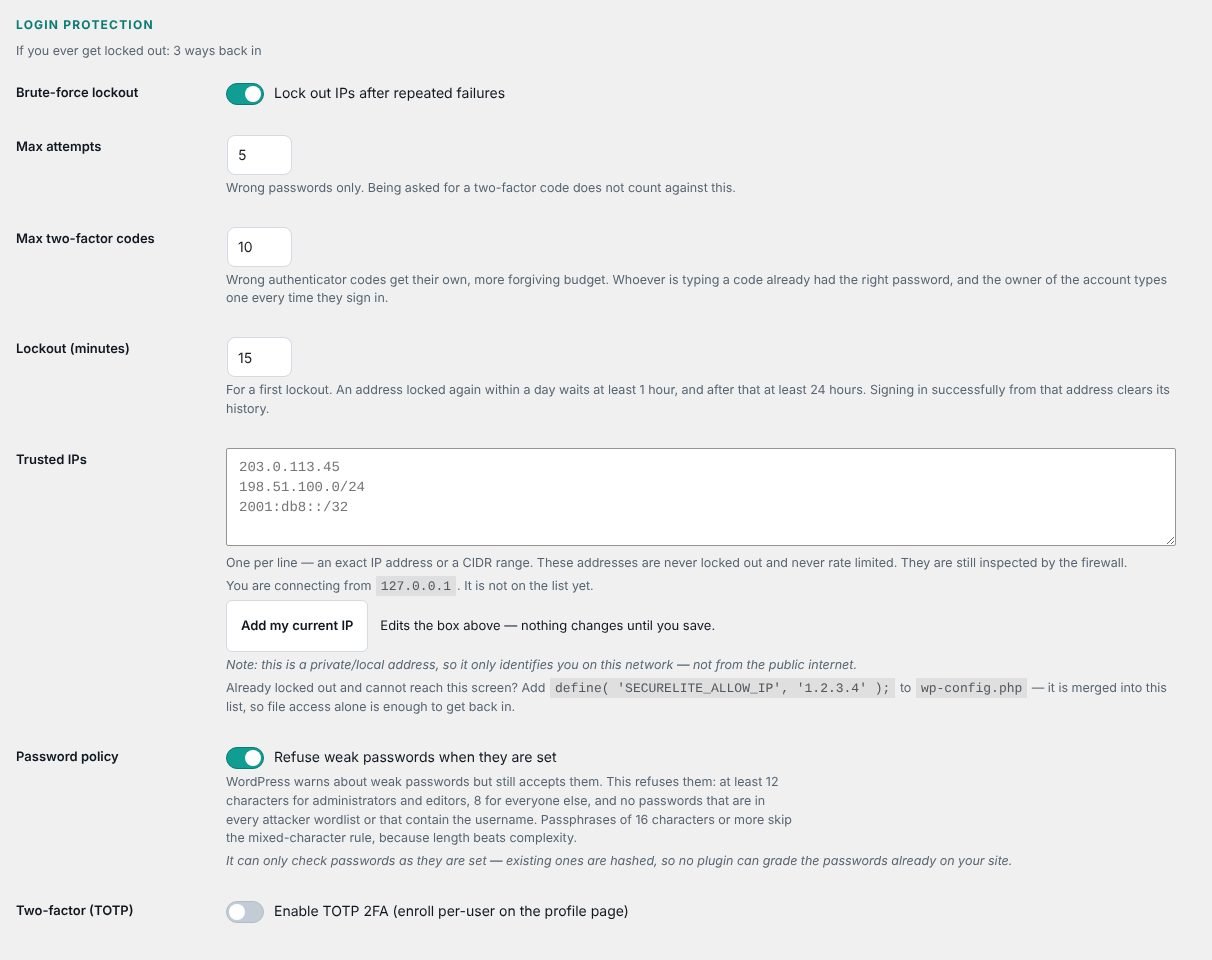
| Locked people out of their own site | Three ways back in; a known username can't be used to lock the owner out; two-factor won't switch on until it's proven. | 0.2.3 · 0.2.7 · 0.2.8 |
| Slowed the site down | Request checks add well under a millisecond; scans are scheduled and never run during a page load. | Launch |
| Cache or Cloudflare conflicts | No proxy in front of the site, and a Cloudflare preset so lockouts see real visitor addresses. | 0.2.8 |
| Too many emails | One daily summary and two kinds of urgent alert. Never one email per blocked request. | 0.2.4 |
Chapter 3 · 7 September 2026
The day we deleted
the cloud service.
The original design had two halves: a plugin on the site, and a SecureLite cloud service it could report to. By September the plugin half was strong. The cloud half wasn't. As built, the connection only ran one way: a connected site sent its security events out, and nothing useful came back.
That meant every site that connected would hand over data about its users and visitors, take on the privacy obligations that come with it, and get nothing in return. It would also have put a service that didn't really exist yet in front of WordPress.org's reviewers.
So on 7 September, in the last audit before submission, we removed it: the transport, its settings, the table it used and the scheduled job that fed it. SecureLite has run entirely on the site ever since. The only outbound request it makes today is to WordPress.org itself, for the official file checksums its malware scan compares against.
A web-reachable test tool
The attack test harness shipped inside the package and could be run from a browser. It was gated to the command line and excluded from the build.
A rate-limiter bypass
A forged cookie name was accepted as proof of login, which switched rate limiting off. It now validates the real login cookie.
No cloud, no account
The cloud transport was removed, and the readme says plainly which outside services the plugin uses: only WordPress.org.
Chapter 4 · October 2026
Field-tested
on a real hack.
In October we cleaned up a WordPress site with a backdoor in three places: nine hidden PHP files, seven administrator accounts the owner never created, and a login token in the database. The plugin's first scan of that site looked for known malicious code. It found none of the nine files, because code wrapped in 15 layers of encoding has no fixed pattern to match.
What found them was a different question: not "does this file look bad?" but "is this file meant to be here?". WordPress.org publishes a fingerprint of every core file for every release. Comparing the site against it turned up all nine. On 8 October that comparison went into SecureLite's scanner, for every site that runs it. The same check clears library code inside WordPress.org plugins that a pattern scan wrongly flags, so a clean file is no longer reported as malware.
Chapter 5 · Our own mistakes
Six bugs we found
in our own plugin.
A security plugin with a security bug is worse than no plugin. These are the serious ones we found in SecureLite, what they could have done, and how each was fixed. Five were fixed before the first public release; the sixth in the first update after it. Open any of them to read the detail.
0.2.2 Configuration backups could be read by anyone
The risk: Before editing wp-config.php, early versions saved a backup next to it in the site root, where a default server setup serves it as plain text. That is the file holding the database password.
The fix: Backups moved, then removed altogether in 0.2.10: SecureLite now edits wp-config.php in place, checks it, and restores from memory if anything goes wrong. Every copy left by earlier versions is deleted on update.
0.2.7 A stranger could lock the real administrator out
The risk: Anyone who knew an administrator's username could keep that account locked by sending wrong passwords, including against the real owner on mobile data, who then couldn't get in to fix it.
The fix: The username lock is now decided after the password is checked. A wrong password is refused as before; the correct one gets in and clears the lock. Guessing gains an attacker nothing.
0.2.8 A locked-out address could still sign in
The risk: WordPress's own password check replaced SecureLite's refusal, so a locked address saw the lockout message but could still log in with the right password, or keep guessing under another username.
The fix: A locked address is now refused for the whole lockout window, whatever the password or username, and Attack Simulation tests exactly this so it can't pass again.
0.2.8 A forged header could dodge the lockout
The risk: With proxy mode on, a forwarded IP header was believed from any connection, so an attacker could send a fake one and appear to be someone else.
The fix: Forwarded headers are only read from trusted proxies (a private network, Cloudflare's edge, or addresses you list), and read from the right, so the address a client claims for itself is never trusted.
0.2.10 Regenerating keys could take a site offline
The risk: A security key containing a dollar sign followed by a digit was written in a way that broke wp-config.php with a syntax error, which takes the whole site down.
The fix: Keys are written literally, and every wp-config.php change is checked to be valid PHP before it is saved. An edit that wouldn't parse is refused.
0.2.14 A two-factor code worked more than once
The risk: The same six digits could be reused for about a minute and a half after they were first accepted.
The fix: Each authenticator code now signs you in exactly once. Fixed in the first update after the WordPress.org release.
The pattern behind all six: each fix also became a check. Attack Simulation now tests the lockout from a fresh username at a locked address, and every wp-config.php change is parsed before it is saved, so the same mistake can't quietly come back.
Chapter 6 · The result
Thirteen attacks,
one honest report.
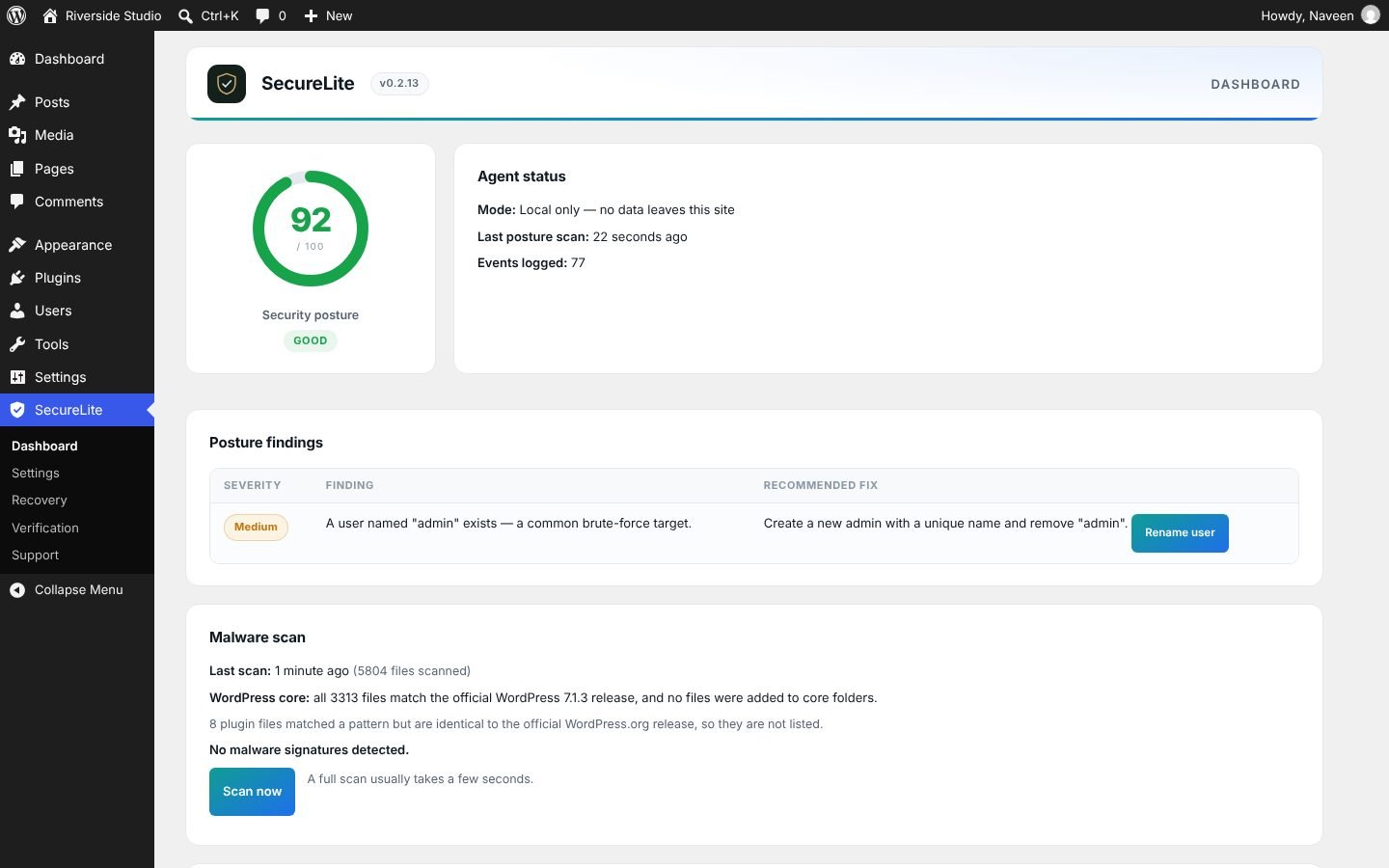
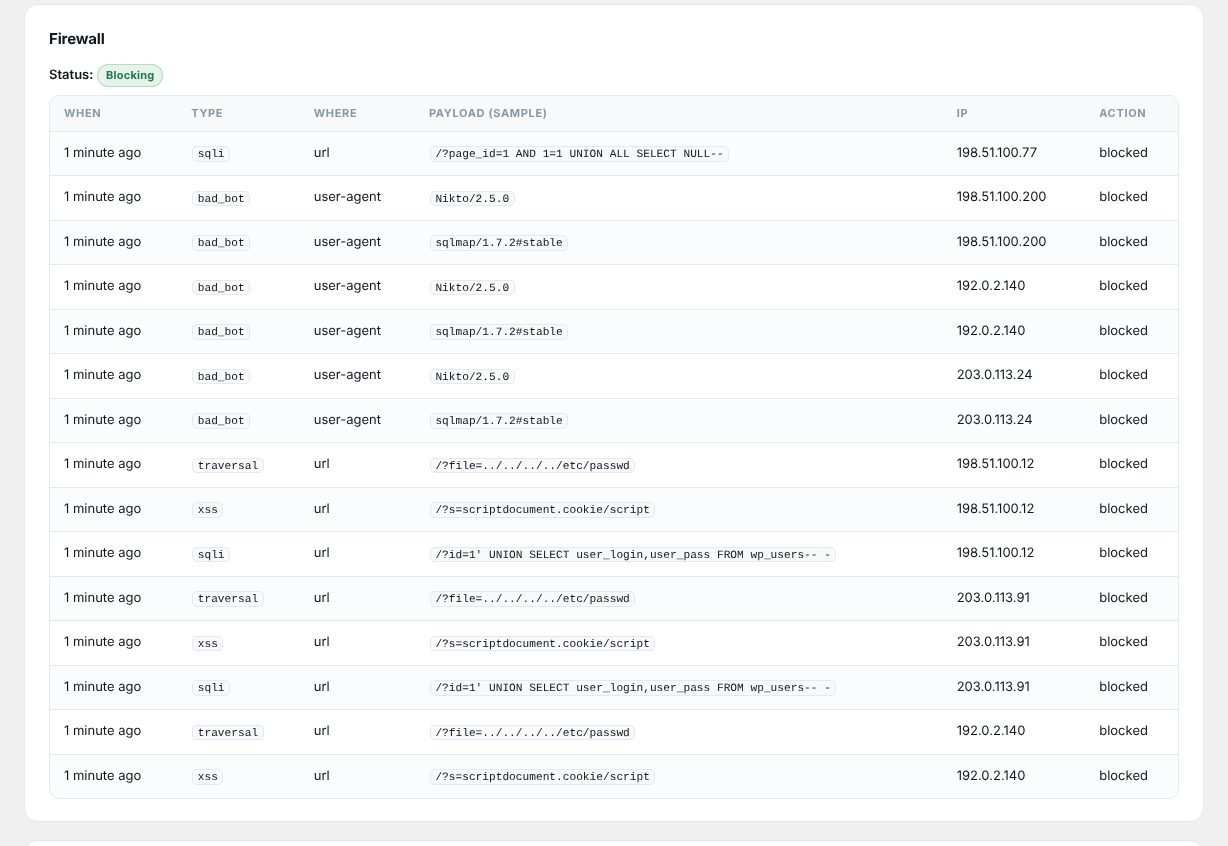
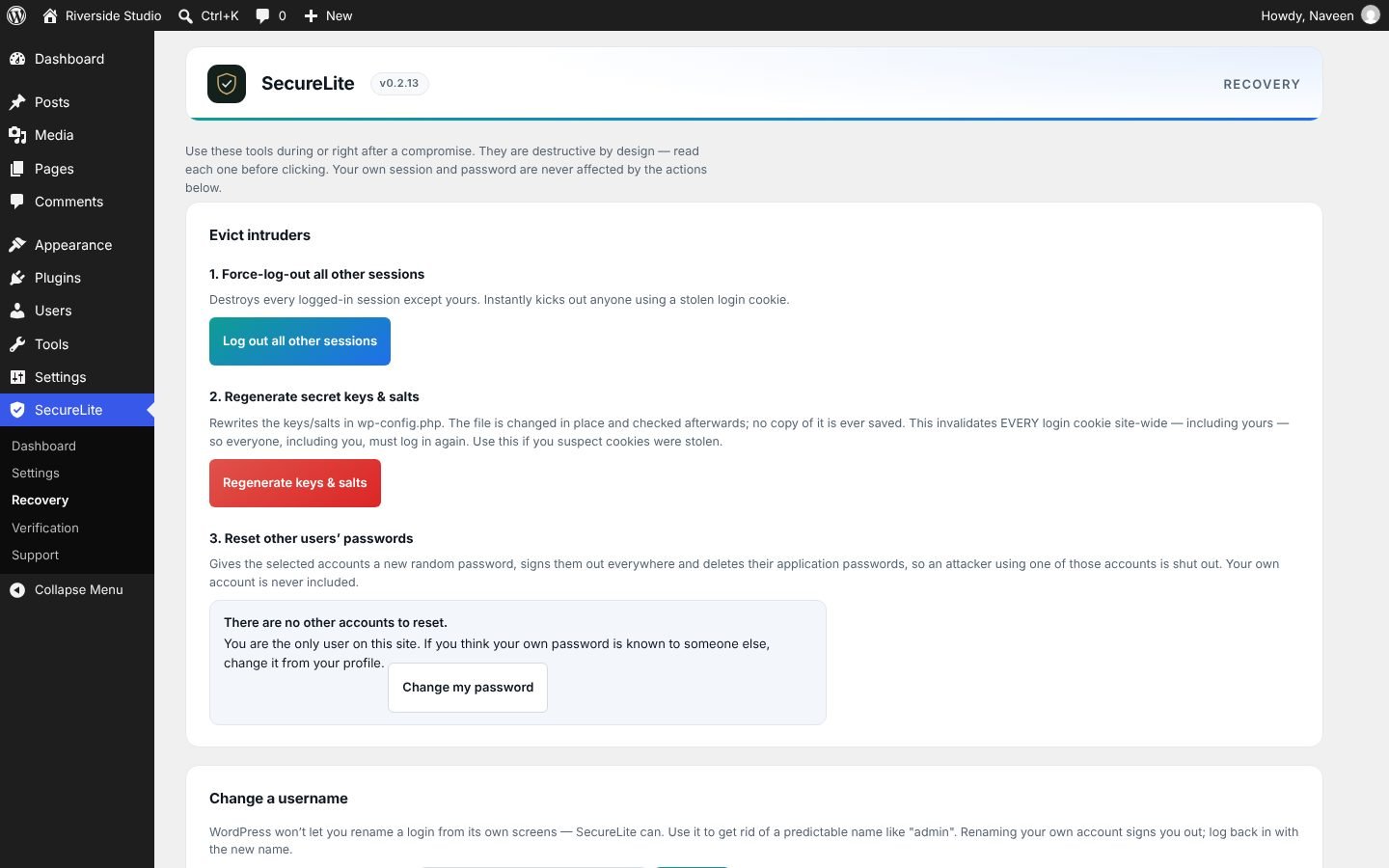
This is the idea the whole project was built around. One button fires thirteen harmless attacks at the site over its own connection, one at a time, and reports for each protection whether it blocked the attack, is switched off, or failed.
How it got here
From first build
to WordPress.org.
- First working versionLogin lockouts, two-factor, file-integrity watch and a security score, plus a written blueprint mapping every feature to how WordPress sites actually get attacked.
- Strategy correctedA feature-by-feature check of a leading plugin's free tier showed our first pitch was wrong. The plan moved to proof, on-site depth and recovery.
- Pre-submission auditThree release blockers and a rate-limiter bypass found and fixed. The cloud service removed.
- 529 reviews readThe problems site owners report most shaped the releases that followed: lockout safety, clean removal, a quiet inbox.
- Hardened and renamedVersion 0.2.8 closed the lockout and proxy-header bugs, and Attack Simulation went live, one check at a time. The plugin took its final name, SecureLite Security.
- WordPress.org review fixesVersion 0.2.10: wp-config.php is never copied anywhere and every edit to it is checked before it is saved.
- Field-tested on a real hackVersion 0.2.11 compares every core file with WordPress.org's checksums, after the backdoor cleanup showed why.
- Live on WordPress.orgVersion 0.2.13 published, followed the same day by 0.2.14: two-factor by QR code, and single-use codes.
What it means for you
Why this matters
if you hire us.

Naveen Kumar
Founder & lead engineer, PixelGravitas · Designs and builds SecureLite
I clean hacked WordPress sites and I build SecureLite, so what goes wrong on real sites becomes a check in the plugin. Every feature in it is free, and it will stay that way. More about SecureLite →
More case studies
See all →db89foundation.com
The cleanup behind SecureLite's checksum scan: nine disguised PHP files, seven fake administrators and a login token in the database.
Read the case study ProofEvery fact checked at the sourceAI outreach platform
Another tool we built for ourselves: an AI system that throws away any fact it can't trace back to its source.
Read the case studyQuestions, answered
SecureLite case study:
common questions.
What is SecureLite Security?
A free WordPress security plugin built by PixelGravitas and listed on WordPress.org. It combines a firewall, malware and database scanning, login lockouts and two-factor authentication, and adds an attack simulation that tests whether each protection actually blocks an attack.
Why would a maintenance company build its own security plugin?
Because the plugins on the sites we clean report that they're protecting the site without showing whether they do. Building our own let us put proof (the attack simulation) and what we learn from real cleanups directly into the tool, for everyone, free.
Is SecureLite free?
Yes. Every feature is free, there is no account or API key, and nothing that is in the plugin today will ever move behind a paywall.
How were the 529 reviews analysed?
We collected one-to-three-star reviews of four dedicated WordPress security plugins from WordPress.org and counted how many mentioned each problem, by keyword, across the title and text. A review can count towards more than one problem. The totals are shown in aggregate, not per plugin, because the point was to learn what goes wrong for site owners, not to rank anyone.
Do your maintenance clients use SecureLite?
Not yet. It was published on WordPress.org in October 2026. We'll say so on our maintenance pages if and when it becomes part of how we look after client sites.
Can you clean a site that's already hacked?
Yes. A plugin can find and report what doesn't belong, but removing the malware and closing the way in is hands-on work. Our WordPress malware removal service does it for a fixed fee agreed before work starts.